Since starting ioCreative’s “Brain Ping” blog for learning information literacy and critical thinking skills online, I have felt that one key topic is activities we can still do for fun online. “Still” is the operative term: not only is the web our place to work and play, but controlling our experience in search of entertainment mindfully is an important skill when everything competes for our attention without always contributing value.
By now, it’s passé to say that social media do not nurture but exploit human connection. Stories such as the Cambridge-Analytica scandal of Facebook selling users’ data have shaken consumers’ faith. We might scroll through our feeds, half our friends’ updates and half advertisements and AI slop, increasingly aware “users are the product.” But sometimes when we leave and search for new experiences, resisting the distraction machine designed to keep us on-site, we rediscover the fun and informative value the web once had front-and-center. It’s not delusion, the real internet is out there and really is being hidden from you.

How I feel explaining this to people. Source: It’s Always Sunny in Philadelphia
So here is a list of ten things you can do online for fun and enrichment, which can break us out of the stupefying grind of focusing only on our socials and news feeds. We have collected over 100 links, almost all free, to help you catch that wave toward “surfing the web” once again.
#1: Play online games
Many of us in the younger generations growing up as internet guinea pigs remember discovering online games by word-of-mouth. What do we hear about these days but toddlers on their tablet apps and Gen Xers on Wordle? But nostalgic sites such as Newgrounds, Addicting Games, and Armor Games still work. Going back further, the Flashpoint Archive and Internet Archive MSDOS Games recreate lost technologies. (Try not to get dysentery in “Oregon Trail”!)
Some games transform offline classics. 20Q.net and Akinator can keep you guessing. Pretend You’re Xyzzy recreates Cards Against Humanity, “the party game for horrible people.” The Oracle of Bacon and Wikipedia Game will show you how everything is connected. Other mind-benders include Jigsaw Planet, Fun Trivia, and Neave.com.
Other games can expand the brain! Freerice is a classic way to test your word knowledge while helping fight world hunger. Folding Story, Plot Generator, and Eveline are storytelling games to inspire your creativity. Word Search Puzzles, USA Today, Razzle Puzzle, Free Word Search, and 24/7 Word Search have some of the best games of this type. USA Today, Washington Post, The New York Times, AARP Games, Boatload Games, and Dictionary.com all offer crossword puzzles (subscriptions may apply).
#2: Create with online art tools
When was the last time any of us outside the arts played with tools just for fun? It may seem less intuitive than when we were kids or had an abundance of programs, but we can always rediscover the joy online.
JS Paint, Kidpix, and Make Word Art recreate programs nostalgic to all who grew up with them on discs. Photopea is a free online Photoshop alternative with equivalent capabilities, and Kleki provides free paint tools. And the Blender 3D engine and Open Game Art assets are open source delights for anyone interested in game design or animation.
You can find convenient shortcuts to image editing online with tools such as the Lunapic editor, Squoosh compressor, Remove Background, Webpage to Gif, and Vector Magic.
Some websites let you make art with tools stylized for you. Weave Silk, WebGL Fluid Simulation, Neonflames nebula painting, Flame Painter Free, Jackson Pollock, Monster Mash, Lacquer Lacquer, and This is Sand can create beautiful images from custom brushes or other tools.
#3: Discover music, ambiance, and meditation tools
Like the art tools, there are sites where you can play around with music. Bandlab, JummBox, Patatap, and Incredibox can help you create catchy beats or even compose.
Several sites can help you discover music from their selections. Mydora, Radiooooo, Gnoosic, Video Game Music, PublicRadioFan.com, and Ektoplasm all have unique features to stream music radio-style and look outside your comfort zone. Your local radio stations often have sites featuring their programming as a live podcast.
Speaking of podcasts, Apple Podcasts, Spotify, Pandora, iHeart Radio, Podchaser, and Player FM all offer endless audio dramas and discussions, often free and divided by genre.
Rainy Mood, myNoise, and A Soft Murmur all stream ambient noise to help you relax and focus. Meditation Oasis, Tara Brach, UCLA Mindful, and Fragrant Heart have additional meditation tools.
You can also learn about music in entertaining ways with the Musicmap infographics, KissThisGuy misheard lyrics, Musgle search engine, and Music Theory On Line courses.
#4: Learn about the arts and sciences
The search for knowledge online can take you to museums, libraries, and other centers of learning! The National Gallery of Art and Smithsonian Open Access allow you to use and license images from their collections free.
The Vatican Museums, Louvre, National Gallery, Smithsonian National Museum of Natural History, Museum of the American Revolution, and National Museum of Modern and Contemporary Art, Korea are among the museums with virtual tours.
For science education, Library Genesis and Science.gov offer public domain articles from journals and magazines. Documentary Heaven and The Most Jaw-Dropping TED Talks provide food for thought for free.
Want to contemplate our place in the universe? The sites Scale of the Universe, 100,000 Stars, and How Many People Are In Space Right Now are classic tools for educating curious minds on space. NASA and Webb Telescope offer interactive experiences, including Astronomy Picture of the Day and Multimedia. You can also explore science through ScienceHack videos and Explore.org animal livecams.
#5: Discover public domain books
Most important works of literature over 100 years old have entered the public domain and can be read free online. Several sites can help you access public domain books and research materials.
Project Gutenberg and Poetry Foundation are among the best online repositories of significant literature. The Library of Congress, Public Domain Review, NYPL Public Domain Collections, and Universal Public Library also provide public domain books, images, and other research materials.
Want to learn about world religion and culture? The Internet Sacred Text Archive offers neatly-organized resources, and most faiths have dedicated websites to read their texts free online.
Many famous authors and literary works have inspired stylized websites. For example, Camden House: The Complete Sherlock Holmes, Edgar Allan Poe Society, The H.P. Lovecraft Archive and Historical Society, and Dickinson Electronic Archive nicely organize these works. Shakespeare Online, MIT, and Folger all have the best on the Bard.
Beyond just Google Scholar, other tools provide search engines for scholarly sources online. RefSeek, BASE Search, Bioline, Directory of Open Access Journals, SpringerLink, and WorldCat can help you search academic journals in the humanities and sciences.
Sites such as What Should I Read Next and OnRead can be great guides to discovering new books.
#6: Learn new skills
DIY sites aren’t all sketchy content farms that tell you to make the jean chair or eat your strawberries with bleach! Sites such as Instructables, Make Magazine, Hackaday, IKEA Hackers, Apartment Therapy, and iFixit have real, quality-controlled no-nonsense tips to craft, repair, and reuse.
The web also offers independent sources for finding specialty and novelty gifts, including FindGift.com, ThisIsWhyImBroke.com, HowToGoBroke.com, and Smellotron fragrances. RetailMeNot searches sites for the best prices.
Want to get recipes without hearing someone’s life story? Food.com, HelloFresh, Bon Appétit, and King Arthur Baking offer free recipes with minimal clutter even before you subscribe to services. Sites such as MrBreakfast.com, Italian Cook, PizzaCooking.com, and the Dotnom ingredient search have a retro, text-based look.
Most of us know about language-learning tools such as Duolingo. But Yojik public domain courses, DeepL translator, and the Omniglot online encyclopedia are nice supplements to any language lesson.
#7: Enrich your critical thinking
In many articles, we discuss the importance of critical thinking and fact-checking on an internet overwhelmed with misinformation. You can develop your critical thinking skills and help inform others with many free websites that also entertain and inspire curiosity.
Snopes provides not only the preeminent fact-checking tool for news online, but also the Archive preserving its delightful old articles on urban legends. Museum of Hoaxes and The Skeptic’s Dictionary are two other classic online resources that can sharpen your incredulity and teach you about some historic curiosities.
On the kookier internet culture side, RationalWiki is a user-edited community debunking conspiracy theories and pseudoscience with critical thinking and good humor. The website What’s the Harm? documents the deadly consequences that believers in misinformation have faced, teaching readers the importance of fighting it with truth.
The University of Washington course Calling Bullshit has a website about exposing misleading data presentations (yes, “bullshit” is a scholarly term!) You can use their book, video lectures, tools, and case studies to get proficient in “calling bullshit” yourself.
#8: Go outside!
The world has changed so much now the internet is in our pockets and not just the designated “computer room.” But the devices that distract us from Touching Grass™ can help us return to it.
Geocaching, the international treasure hunt using GPS coordinates to find containers with logbooks, is a favorite game of mine. Using the app, you can find adventure and rethink your surroundings anywhere you go in the world. Opencaching, Letterboxing, Waymarking, and Munzee are related games or networks to get you outside and hunting.
Do you seek travel destinations based on curiosities, roadside attractions, and local legends? Of course you should! Atlas Obscura, Tripadvisor, and Roadside America offer the best in quirky, kooky landmarks to visit near you, plus fascinating articles.
Identifying flora, fauna, and fungi has become a trend of late! iNaturalist, Ultimate Mushroom, Mushroom World, Pl@ntNet, Merlin Bird ID, and the National Audubon Society are all popular sources. Just be sure you’re more knowledgeable than any algorithm before you eat anything wild!
You can even use the Web to beat the light pollution and find the best locations for stargazing. Check out Dark Site Finder and Dark Sky Map for guides on where to look into infinity.
Source: Bill Watterson, “Calvin and Hobbes”
Not to talk about the weather, but wttr.in and weather.maniac.com mix things up with text-based forecasts. The Old Farmer’s Almanac provides weather, gardening, astronomical, and homesteading information like you’re farming in the old country!
With Find A Grave and BillionGraves, your local cemetery can be a perfect spot for genealogy and history research, photography, or just a walk among the monuments. (No bones about it!)
#9: Rediscover netizen culture and web surfing
People don’t “surf the web” like we used to, huh? Mostly we search for tools, answers, and products we immediately want — seeking entertaining websites is a lost art like “channel surfing” since the advent of streaming. But we can still find websites that are true experiences, art for art’s sake in hypertext, with some intent and guidance.
Back when we were “netizens”, surfing “cyberspace” allegorized like a physical space, Net Art was the term for art projects unique to the Web. To name examples: Zoomquilt and Zoomquilt 2, Arkadia, and Infinite Flowers guide the viewer through endless images. Nobody Here is an interactive art project you can explore through its links and animations for hours. The site noclip lets you scroll through popular video games’ maps within your browser. And in web design, the Yale School of Art, Cameron’s World, and WINDOWS93 sites recreate the look and feel of retro computing.
Some sites provide hours of reading unique to the web. The Exit Mundi end-of-the-world scenarios and Interactive Fiction Archive are classic sites commemorating nerdy online forms of storytelling. PostSecret is the once-viral blog of postcards received over 20 years, and Letter to My Future Self lets you email yourself in the same spirit. Sites such as Everything2 and Fusion Anomaly are sprawling oddities of user-submitted writeups on fascinating subjects, so expansive you will never read to their end.
Any list of fun things online wouldn’t be complete without links to “useless websites” — which really aren’t if you’re having fun! Sites such as Bored?, the Bored Button, and The Useless Web link you to games, art projects, and other novelty sites that solely entertain. Special shout-out to Koalas to the Max and Neal.fun as games that leverage the wonders of the Web.
The web also hosts countless inspired fansites for TV, movies, books, games, and music. As just one example: my love of Pink Floyd’s music is enhanced by tribute sites such as Pink Floyd Archives, The Pink Floyd Fandom, The Wall Analysis, and The Wall Complete. (Also in British media, Monty Python’s Completely Useless Web Site is an impressive collection!) Just start with wikis, forums, and searches: if it has a dedicated following, you can find cool sites for it.
#10: Create webrings and personal websites
As a digital marketing firm, we embrace and design the types of modern sites that help companies compete for SEO. But as creative people, we also appreciate the internet’s capacity as a tool for self-expression — which gets lost on streamlined social media with few customization options. Underground communities on the “indie web” or “cozy web” recreate the charmingly “maximalist” designs that made “Web 1.0” (before search engines) look like THIS:
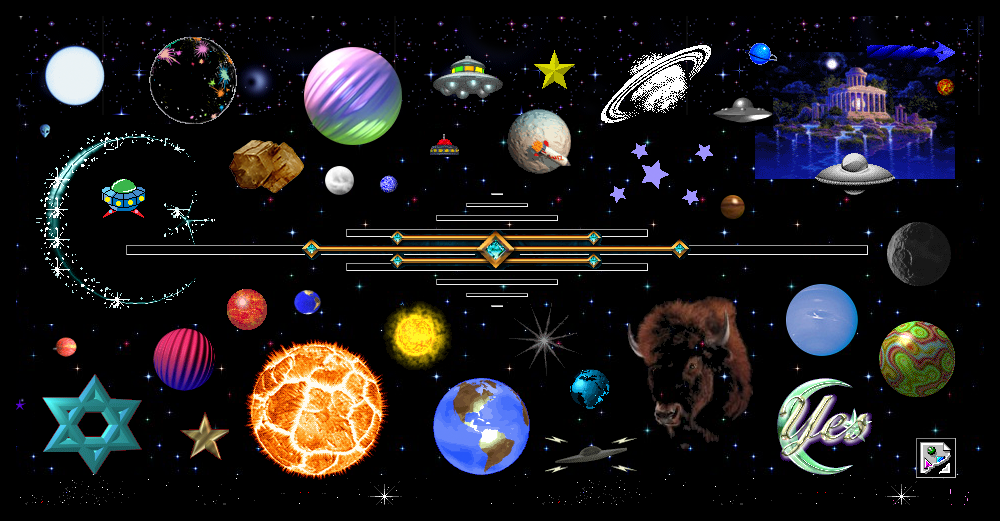
Source: cameronsworld.net
My god, it’s full of stars.
You can discover this “old web” revival movement by searching for “webrings” (an old term for link directory sites) or browsing hosts such as Neocities. Ancient sites that inspired these communities are viewable through The Geocities Gallery. You can easily create modern one-page sites through Carrd and Linktree, ideal for grouping your socials professionally. But for fun escapes from the minimalist rat race, the ASCII Art Collection, ASCII Art Generator, Unicode Text Converter, and Text Fancy can help you render text in style.

Everyone should know the Internet Archive: home to public domain books, films, and webpage mirrors. The Wayback Machine saves archived versions of countless URLs throughout their history, and you can search keywords within the archive. Wiby, Marginalia, Search My Site, and The Old Net are independent search engines that prioritize old-style sites, typically for fewer ads and less Javascript.
Online tools can make learning HTML and CSS fun and freeing. W3Schools offers full, free courses on markup languages, and sites such as iLovePDF, PDFescape, and Embed Responsively make functionality easy. Graphic collections such as GifCities and CatStuff can bring that sparkle back into web design.
Bonus #11: SEARCH (for what you want)
As I’ve aimed to show, retaking control means taking back the wheel from social media autopilot. When we search mindfully for the experiences we want to discover outside what algorithms feed us based on our interests, we can break out of the echo chambers to find something new. I’ll just leave udm14.com (“the disenshittification Konami code”) right here for your AI-Free Search enjoyment.
With thoughtful browsing, that limitless potential can be at your fingertips once again.